Not at all.but flipaclip take’s a lot more skill to make amazingamazing animations for example if I was to try and make the
Mewlia vs Mr animation in flipaclip for how long I’m planning to make that animation it would legit take me 6 month’s.
Replying to:dezwaymain reasons I joined here were A) i wanted to socialise wit
Consider CoD BOII.
With a small group, it’s fun. You get along, you all have a unique playstyle.
But when you play online it’s full of scum. Hackers, people who just scream down the mic, the exact same playstyle of running out in the open, it doesn’t feel like a realistic tactical shooter at all.
SN is the same. SN is that local play, just a few guys with unique ideas, it’s fun.
Lemme explain my reasoning.
Extiction has only had 1 game where we’ve seen development of the story whereas Treyarch’s Zombies(the original CoD Zombies mode) has had technically 5 games (counting Black Ops 4) to develop the story.
Replying to:UnknownBecause the CoD fanbase hates change and will regard anythin
listen, I loved Extiction… even though I couldn’t get past the first few hives/nests(i can’t remember which one it is)… but Zombies’s Lore is oddly deep… hell, I’m pretty sure that Five has something to do with the story, and the main four characters of zombies weren’t even involved with that map
Replying to:PermaThat's why you don't play with randoms in most games
-The
Same. Playing R6 is fun for me cause unlike every other game, people listen to my tactics and we can wipe the floor with the enemy team because of them
I think this might be something you can fix in the settings by changing app settings of always open with. I’ve never encountered the issue before so I can’t go into much more depth.
I’ve never used Flipaclip before, so I don’t know if you have to delete it (as unitystars said) or what, but I had a similar problem with my online school work. I had to select my homework file using my file directory but I had set the default opening app for those types of files as Stick Nodes. So I went to my settings and made it to where I actually choose which app to open it in.





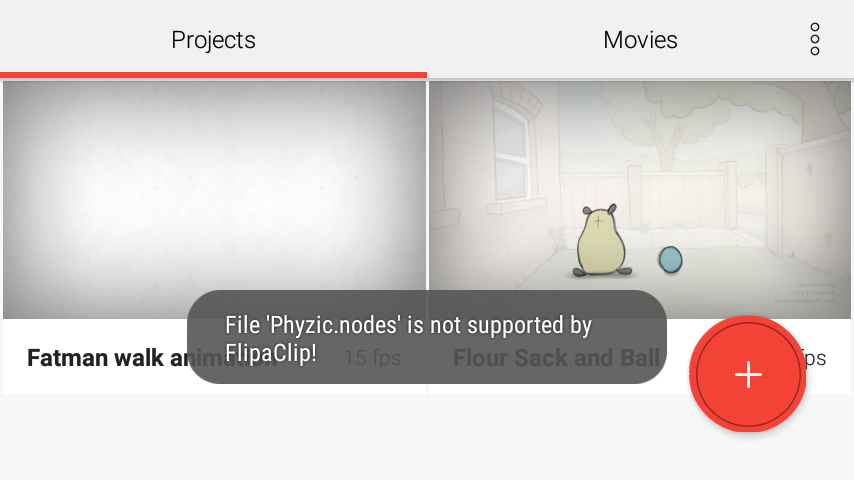

delete flipaclip and then set sticknodes as your default that should work
Damn I really wanna use flipaclip
orrrrrrr you could download file manger so that every time you download a pack look for it and press open in stick nodes
User Banned
SN Supreme
Is it?
User Banned
Yes
User Banned
Do you doubt the holy land
Not at all.but flipaclip take’s a lot more skill to make amazingamazing animations for example if I was to try and make the
Mewlia vs Mr animation in flipaclip for how long I’m planning to make that animation it would legit take me 6 month’s.
User Banned
But SN will look just as good.
Anyway, if you’re going there to spew out base fig fights then sure, go ahead.
main reasons I joined here were A) i wanted to socialise with people like you, Ralph, and bullet
and B) because it was a small enough community that I could be known and actually be able to talk to said people I just mentioned
and C) because people here are unique
i don’t know why anyone would leave here, any other communities are way too big to be fun, and not as unique as this one.
User Banned
Consider CoD BOII.
With a small group, it’s fun. You get along, you all have a unique playstyle.
But when you play online it’s full of scum. Hackers, people who just scream down the mic, the exact same playstyle of running out in the open, it doesn’t feel like a realistic tactical shooter at all.
SN is the same. SN is that local play, just a few guys with unique ideas, it’s fun.
i dislike playing COD BO2 online
i most often play it against bots when I’m bored or with my family
never online, mainly because I’m a skrub and also the reasons you just mentioned
*zombies exists for a reason* go buy one of the DLC maps, Transit isn’t good
i have all of them
User Banned
Extinction > Zombies
Treyarch Zombies has a better sory
User Banned
LISTEN THE F**K HERE
Lemme explain my reasoning.
Extiction has only had 1 game where we’ve seen development of the story whereas Treyarch’s Zombies(the original CoD Zombies mode) has had technically 5 games (counting Black Ops 4) to develop the story.
User Banned
Because the CoD fanbase hates change and will regard anything that isn’t Zombies as trash.
listen, I loved Extiction… even though I couldn’t get past the first few hives/nests(i can’t remember which one it is)… but Zombies’s Lore is oddly deep… hell, I’m pretty sure that Five has something to do with the story, and the main four characters of zombies weren’t even involved with that map
User Banned
Okay, recently a guy made a review of all 5 Extinction chapters.
Watch it and come back here
Like, The Modern Day Hitler “A Guy” or just someone on youtube?
User Banned
Random dude
I’ve already forgotten what his name is… But I finished watching the videos about half an hour ago
User Banned
Kool
“black ops 3 is the best call of duty game”
me:
User Banned
Ghosts = best
Fite me
transit is good fight me
That’s why you don’t play with randoms in most games
-They aren’t gonna listen
-They don’t care about the team
-They don’t care about the objective
-They’re annoying
-And they usually yell at anyone who isn’t performing to their standards
I’m a sucker for team games, but when I get a bad team I rage a lot, maybe more than I should.
User Banned
Same. Playing R6 is fun for me cause unlike every other game, people listen to my tactics and we can wipe the floor with the enemy team because of them
I think this might be something you can fix in the settings by changing app settings of always open with. I’ve never encountered the issue before so I can’t go into much more depth.
I’ve never used Flipaclip before, so I don’t know if you have to delete it (as unitystars said) or what, but I had a similar problem with my online school work. I had to select my homework file using my file directory but I had set the default opening app for those types of files as Stick Nodes. So I went to my settings and made it to where I actually choose which app to open it in.
i used flipaclip
but i sucked so i left
you’re not supposed to open a “nodes” file, just download it, then go open SN
SN scans your download folder and finds nodes files